Wednesday, June 3, 2015

OBIEE 11.1.1.9 New features - Interface, part 2

I covered some new features in part 1. Here I will cover few more. Some of the features covered here are available since 11.1.1.7.10 and 11.1.1.7.16 but are new for many OBIEE users.

There is a new feature in Prompts: Ability to arrange check boxes and radio buttons layout Horizontally as well.


The most interesting Prompt feature is not defined in Prompts but rather at the Dashboard definition page level. It's the ability not to run the dashboard, before prompt is applied.

The definition is hidden under Edit Dashboard / Dashboard Properties:
When such page is marked, the first time you open it, you will see:

The normal behavior will resume after selecting prompt values and pressing the Continue. this happens only the first time. For additional details see the Users Guide.
To remove this option from OBIEE see the Admin Guide 

Once you are in editing dashboard, you might see the Advanced Page properties option that set the scope of parameters in cases of Go URL, Prompted URL and Navigate to BI content:

In Graphs, when selecting Stacked Vertical Bar or Stacked Horizontal Bar, and setting the data labels to "always", we have centralized aligned data labels.
In Tables, Pivot and similar you can see Column properties from the edit window as well.

in the same place we can also create New calculated Measure.


Analysis Advanced Tab, there is a new options here:DIMENSIONALITY:

Dimensionality: (from the Users Guide) Show Total value for all measures on unrelated dimensions.  Select this check box to include the ENABLE_DIMENSIONALITY variable at the beginning of the
SQL statement: SET VARIABLE ENABLE_DIMENSIONALITY = 1;
Setting ENABLE_DIMENSIONALITY may allow cross subject area queries to
return non-null results for certain measure columns that would otherwise return
null values when ENABLE_DIMENSIONALITY is not set. The measure columns
may also contain duplicated values when ENABLE_DIMENISONALITY is set.
Personal note: Shiran, it was made for you.


Monday, June 1, 2015

ilOUG tech Days 9/6 -10/6

Next week ilOUG is running 2 days of lectures in Haifa Dan Carmel hotel. Seems like very interesting agenda.
A little update, I will replace Tovit in the Big Data Discovery lecture.


Monday, May 18, 2015

OBIEE - Upgrading my Windows 11.1.1.7 to 11.1.1.9

OBIEE 11.1.1.9 is available. So I will upgrade my existing installation of 111.1.1.7 to 11.1.1.9. 

Follow Upgrade Guide, chapter 1.7 1.7 Moving from 11.1.1.3, 11.1.1.5, 11.1.1.6, or 11.1.1.7 to 11.1.1.9.   

Note: Out of Place BI Upgrade is NOT supported and the procedure is not documented in the guide. the following is In Place Upgrade.

For Linux OBIEE upgrade description, see link to post by Andrew at the bottom of this post.
0. My weblogic is 10.3.6, so no need for upgrade.
1. Stop All and stop the service of Node Manager (Oracle WebLogic NodeManager (D_MWHOME_wlserver_10.3) in my case) under services.
2. Backup, Backup, Backup.
3. Run the installer. Select the Software only option and the existing OBIEE folder (my was D:\MWHOME), that was the default. Next accept the weblogic there.
R

4. Run patch Set Assistant (D:\MWHOME\Oracle_BI1\bin\psa.bat) and upgrade the RCU (after backup and version certification - http://www.oracle.com/technetwork/middleware/bi/bi-11gr1certmatrix-11-1-1-9-0-2541437.xls - the 3 RCU entries in the Database sheet).  


5. Start the Node Manager service and Admin Server (D:\MWHOME\user_projects\domains\bifoundation_domain\bin\startWebLogic.cmd on my computer).
6. Run ORACLE_HOME\bin\config.bat (on my computer it's D:\MWHOME\Oracle_BI1\bin\config.bat). Select the Update BI Domain option, fill parameters and run Configure.

7. I had a problem in the "starting the Managed server" phase. So I've run "startManagedWebLogic.cmd bi_server1" manually from D:\MWHOME\user_projects\domains\bifoundation_domain\bin\. I had to run the configuration utility twice, until it worked.

Now it's working :)
 -------------------

One more recommended step (in any OBIEE upgrade) is to go to Administration page and run "Scan and Update Catalog Objects That Require Updates". 


(not really critical in my case)


In the document you can also find the option of running the above in silent mode and a note about the change in users folders behavior; Unlike previous releases 11.1.1.9 users folders are created only when needed and not in advance, they also have a different structure. The guide suggests optional step to alter them.  


The following list shows the structure of the Oracle BI Presentation Catalog for a user before Release 11.1.1.9.0:
/users/<user>
/users/<user>/_delivers
   /users/<user>/_delivers/_deliveries
/users/<user>/_filters
/users/<user>/_portal
/users/<user>/_selections
/users/<user>/_savedcolumns
/users/<user>/_subscriptions
/users/<user>/_thumbnails
/users/<user>/_prefs
   /users/<user>/_prefs/deliveryprofiles
/users/<user>/_prefs/devices
The following list shows the structure of the Oracle BI Presentation Catalog for a user in Release 11.1.1.9.0 and later. Objects previously stored in the "_prefs" and "_subscriptions" folders are moved to the "_internals" folder. The "_deliveries" folder is merged with its parent folder "_delivers".
/users/<user>/_delivers
/users/<user>/_portal
/users/<user>/_filters
/users/<user>/_selections
/users/<user>/_savedcolumns
/users/<user>/_thumbnails
/users/<user>/_internals
   /users/<user>/_internals/subscriptions
      /users/<user>/_internals/subscriptions.atr
   /users/<user>/_internals/_deliveryprofile_profile1
      /users/<user>/_internals/_deliveryprofile_profile1.atr
   /users/<user>/_internals/_device_device1
      /users/<user>/_internals/_device_device1.atr
   /users/<user>/_internals/_favorites
      /users/<user>/_internals/_favorites.atr
   /users/<user>/_internals/cacheduserinfo
      /users/<user>/_internals/cacheduserinfo.atr
   /users/<user>/_internals/volatileuserdata
      /users/<user>/_internals/volatileuserdata.atr
   /users/<user>/_internals/defaultdevices
      /users/<user>/_internals/defaultdevices.atr
   /users/<user>/_internals/defaultdeliveryprofile
      /users/<user>/_internals/defaultdeliveryprofile.atr
   /users/<user>/_internals/userprefsxmlstore
      /users/<user>/_internals/userprefsxmlstore.atr


There is a Linux upgrade post by Andrew from http://bisoftdiary.com:http://bisoftdiary.com/obiee_11117_to_11119_upgrade. In his case weblogic server upgrade was required as well.

Sunday, May 17, 2015

OBIEE 11.1.1.9 New features - Interface, part 1

This post is about changes of User Interface of OBIEE 11.1.1.9. If you are looking for information about serious new features, you should read the brilliant, interesting and generally not-bad post by Robin Moffatt: What’s New in OBIEE 11.1.1.9 for Systems Administrators and Developers. Mark Rittman covered the long awaited support of Hive2 and Impala here.

They say "the god is in the details"; It seems that that god of details, that so often stays in Cupertino, had a visit in Redwood Shores, with the release of OBIEE 11.1.1.9.
You want an example?
 It's the little things some of them nobody bothers to mention in the "New Features" documentations. For example: the "View Properties" option we can access without entering/editing the specific view:


Or the  ability to have much better control in session Manager (Robin Moffatt has more to say about it)


 If you are a printing person:


  • The Custom Orientation control for PDF and PPT.
  • The marks that specify whether to include charts, images and formatting.
  • New option to specify whether to wrap text in columns.
  • New option to limit column width.
  • Unfortunately the change of default of Print Rows to all, didn't work for me. 

Of course they are cooler features:
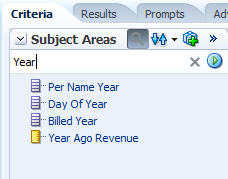
Search in analysis metadata is one of the long awaited options:


(I'm personally less excited about the Sort option there).


One more great feature is the Save Column option:
Just the same way we can save filters and use them in various analysis, we can now save columns/formulas. This way complex columns, with variables, calculations... can be used. This is critical for advanced users.

There is one more somewhat similar feature of Global Variables:

In the Global Variable Menu we can press the Plus sign and add a new Global Variable:
There I can select name and paste/type a Value. there is something tricky with the Type, for example the formula 100*"Base Facts"."Revenue"/"Base Facts"."Billed Quantity" the type was text and not number.
Now I can reuse the Variable:

The result is the same as similar formula, of course:

The question is when to use Global Variables and when Save Column, is not clear to me at this point.


One more nice feature is the Treemap:

As all visualizations, you can drill in it etc...

The colors can be binned or continuous and there are sets of colors available:


I will continue with more new features and hidden jams in the next part.